Introduction
In this lesson, we learn how to apply some important modifiers to a Text view.
In this lesson, we did not modify the MyApp file that was used in the previous lesson. Only the body of the ContentView file has been replaced with new views and modifiers.
Basic modifiers
A Text view displays a string on the user interface. The appearance and layout of the string can be defined using modifiers.
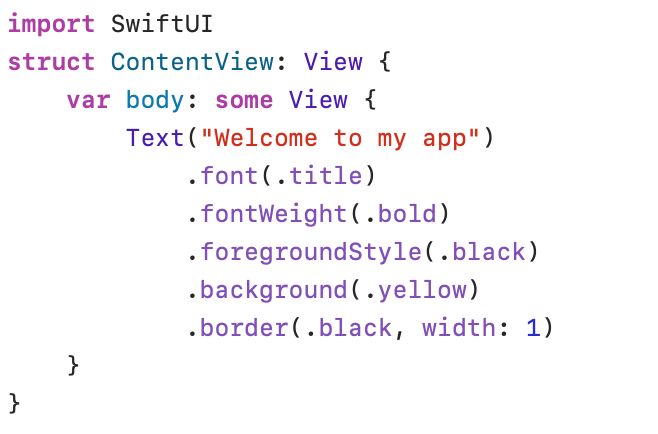

The Text view displays the text “Welcome to my app” in the user interface. Various modifiers change the appearance of the string:
.font
With the .font(_:) modifier, you can adjust the type and size of the characters. For the sake of consistency and to ensure compatibility between platforms, Apple has established several predefined font styles.
The predefined .font styles are named: .extraLargeTitel2, .extraLargeTitle, .largeTitle, .title, .title2, .title3, .headline, .subheadline, .body, .caption, .caption2, .footnote .
.fontWeight
With the .fontWeight(_:) modifier, you can adjust the thickness of the characters.
The following weights are available: .black, .bold, .heavy, .light, .medium, .regular, .semibold, .thin, .ultraLight.
.foregroundStyle
With the .foregroundStyle(_:) modifier, you set the color or pattern to use when filling the foreground of a view. There are various standard colors available: .black, .blue, .brown, .clear, .cyan, .gray, .green, .indigo, .mint, .orange, .pink, .purple, .red, .teal, .white, .yellow.
.background
The .background(_:) modifier can be used to color the background of a view or to use a pattern to fill the background.
The same colors as mentioned in the section .foregroundStyle can be used.
.border
With the .border(_:width:) modifier, you can draw a border around the view. The width parameter is used to define the thickness of the border.
The order of execution
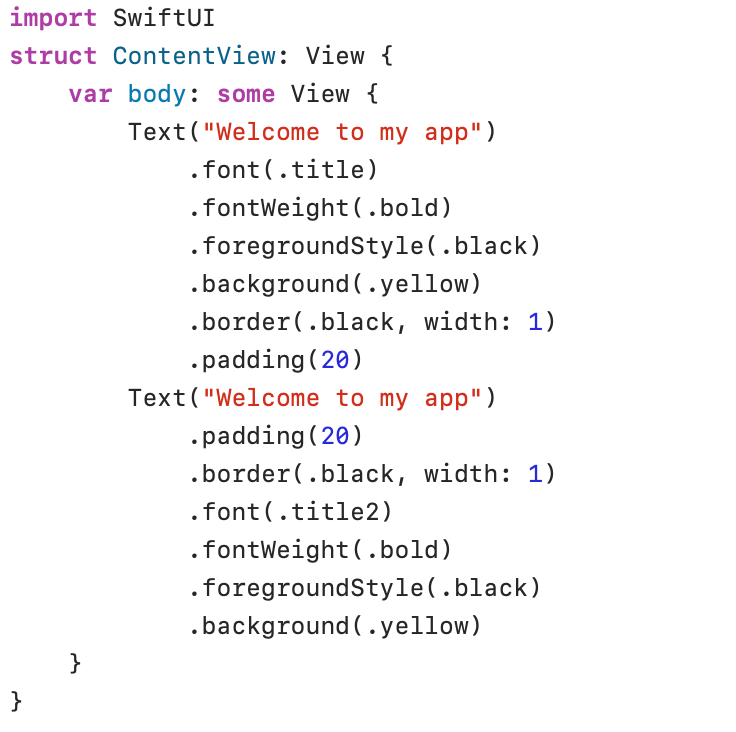

In the example above, I introduced the .padding(_:_:) modifier. The .padding() modifier adds some empty space to the edges of a view. In the first Text view .padding(20) has been added after all other modifiers. In the second Text view .padding(20) is the first modifier.
The difference in the result is clear. In the first Text view, the background color and the border are set before the .padding(20) modifier. .padding(20) has been applied, but you cannot see it. In the second Text view, empty space was added first, and only then was the entire space colored and provided with a border.
Modifiers are executed in the order they are listed!